
Your keyword list has a gap that nobody is filling. Somewhere in your account’s negative keyword sheet, a teammate added “cancel [competitor]” as an exclusion because it didn’t match your product. That single decision just cost you the most receptive buyers in the auction. They are not comparison shopping. They are leaving. The decision is made. They are only looking for what comes next.
This is not theory. A SaaS account ran the exact keyword “cancel [competitor] contract” last year. It returned a 15 percent click-through rate and a cost per acquisition roughly 18 percent lower than the account’s generic campaigns. The auction was nearly empty. Few competitors were even bidding on it, because keyword tools don’t surface it and account builders treat it as off-topic. The search itself says everything: the user has already done the hardest part of the sales cycle and is now choosing a replacement on pure friction.
Why Cancellation Searches Are The Best Intent You Will Never Mine
Standard PPC keyword logic starts from demand that already looks like demand. “Best CRM software,” “[product] pricing,” “[category] reviews.” Every competitor in your vertical is bidding on that tier. The CPCs reflect the crowding. The click goes to whoever has the deepest pockets or the longest optimization history.
Cancellation searches operate in a different market entirely. “Cancel [competitor] contract,” “[competitor] refund,” “switch from [competitor] to,” “why [competitor] left us.” None of these queries mention your product. Most keyword tools will not even suggest them, because the search volume is small and they don’t match your product terms. The searcher is not evaluating your offer against a peer list. They are exiting one and need an exit ramp.
The economics of that moment are unusual in paid search. Intent is fully established, which compresses the sales cycle. Competition is near zero, which keeps CPCs low. And the ad copy can be radically specific, because you already know why this person is searching. The three numbers from the SaaS example capture it: 15 percent CTR against an account norm that rarely clears 4 or 5 percent. CPA 18 percent below the generic campaigns. And a close rate on those leads that ran well above the account baseline, because the only question left was vendor selection, not problem validation.
15% CTR
The click-through rate on “cancel [competitor] contract” in one SaaS account, against a generic-campaign CTR that rarely clears 5%. The cancellation query is the single highest-intent, lowest-competition tier in the account.
Why “Cancel” Gets Excluded By Default
Most PPC teams build negative keyword lists the same way. Product terms first, modifiers second, comparisons third, then a cleanup pass where anything that does not obviously match the landing page gets excluded. “Cancel [competitor]” fails that test. The landing page sells your product. The query mentions a competitor and a verb that does not look like buying. Measured against relevance to the page, the exclusion is defensible.
Measured against intent, it is the opposite. You excluded a person who is actively leaving your competitor and has not chosen a replacement. The relevance test asks “does this query match my page.” The intent test asks “what problem is this searcher solving right now.” Cancellation queries fail the first test and pass the second by a wide margin.
The deeper reason the exclusion persists is that the data needed to build these campaigns does not sit with the paid search team. Review sites, support forums, cancellation surveys, and churn reasons live in customer success, product, and CX. The paid team receives a keyword list and a landing page and is told to make the numbers work. The complaints that would make the ad copy irresistible are sitting in a different department, untapped.
The habit is also trained in. Most PPC certification and agency training runs on the relevance test: does the query match the page, exclude it if not. Nobody in the pipeline teaches the intent test, because the intent test requires the account builder to read the competitor’s review sites and understand what their customers are actually complaining about. That is research work, not keyword work, and it falls outside the campaign-building sprint. The negative keyword sheet is the artifact that gets signed off, and “cancel [competitor]” looks like the obvious exclusion on a sheet that is 400 rows long.
The result is a structural gap in nearly every B2B account: a tier of search demand that is high-intent, low-competition, and systematically excluded by the same relevance test that also excludes genuinely irrelevant traffic. The fix is not to stop excluding bad traffic. It is to run the two tests separately and let the intent test own the cancellation tier.
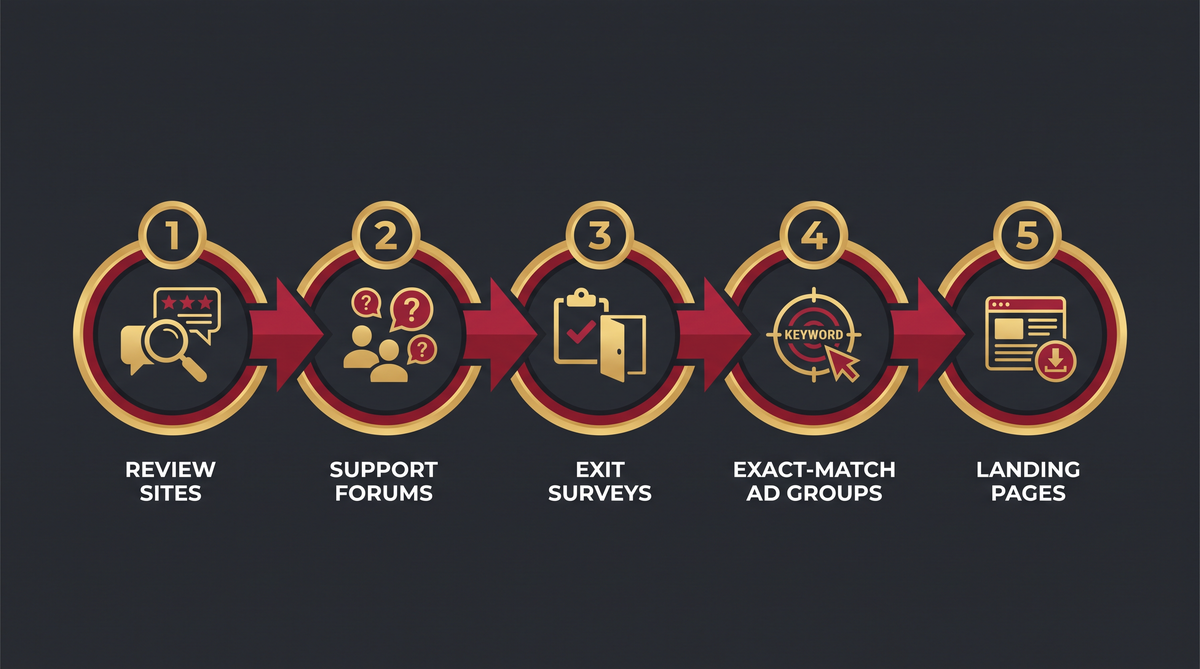
The Five-Step Churn-Signal Mining Workflow
Here is the buildable version. Five steps, each one feeding the next. This is the system the SaaS account ran, compressed into a workflow you can implement in a week.
Step 1: Mine the competitor’s review sites for exit language
Pull reviews from the competitor’s G2, Capterra, and Product Hunt profiles. Filter on one-to-three star reviews from the last six months. You are not looking for feature requests. You are looking for the specific frustrations people are living with right now: “we switched from X because their invoicing broke,” “support stopped responding after our renewal,” “the price doubled at renewal and we are looking for an alternative.” Each of those sentences is ad copy you can run today, not a product roadmap item.
Step 2: Read the support forums and complaint threads
Support forums and Reddit threads about the competitor carry the same signal with more detail. Search for the competitor name plus “cancel,” “switch,” “alternative,” “refund,” and “left us.” The language people use to describe why they are leaving is the language your ad copy should use to show you understand. “We are stuck because migration takes quarters” tells you your landing page needs to lead with a fast onboarding story.
Step 3: Mine exit surveys and churn surveys
If the competitor publishes a churn survey or an “why customers leave” post, mine it. Many SaaS and B2B vendors run these and summarize the results. The top three exit reasons are the top three ad copy angles. If “pricing” and “support” and “contract lock-in” are the top three, your ad copy is: “No lock-in. Support that responds. Pricing that doesn’t double at renewal.”
Step 4: Build the exact-match ad group
Create a separate ad group, not a campaign, inside your existing account. Exact match only. One ad group per competitor. The keywords:
- “[competitor] cancel”
- “[competitor] switch to”
- “[competitor] alternative”
- “[competitor] refund”
- “cancel [competitor] contract”
- “leave [competitor]”
Each keyword gets its own ad. The ad copy must signal immediate understanding of why this person is searching. Not “Try our product.” Instead: “Leaving [competitor]? We import your data and get you live in two weeks.” The first line does the qualification for you. Only people actually in the switch will click. Everything else is filtered by the ad copy itself.
Step 5: Build the dedicated landing page
Someone searching “cancel [competitor] contract” does not need a product feature list. They need three things on the page: switching is easy, you understand why they are leaving, and the specific pain that drove the search will not follow them to you. The strongest version of that page leads with a full switch service. Data import, onboarding help, a named migration lead, and a timeline. “We will have you off [competitor] and live in thirty days.” That offer is what closes the deal the keyword opened.
| Step | What you mine | Where it lands |
|---|---|---|
| 1. Review sites | Exit language in 1-3 star reviews | Ad copy that names the pain |
| 2. Support forums | Migration and lock-in complaints | Landing page proof |
| 3. Churn surveys | Top three exit reasons | Offer angles |
| 4. Exact-match ad group | Six keyword variants per competitor | Dedicated ad group |
| 5. Landing page | Switch service, timeline, named lead | One page per competitor |
The Offer Mismatch That Kills The Campaign
The keyword gets you into the auction. The offer is what closes the deal. An agent who bids on “cancel [competitor] contract” and sends the click to the same generic product page every other campaign uses makes the same mistake a broad-match campaign makes, just faster and with more conviction. Automation amplifies whatever offer you point it at. If the offer does not match the intent, you are scaling a miss.
The specific mismatch to watch for: your landing page answers “what can we build” and the searcher is asking “can I get off this contract without breaking my operation.” Those are different questions. The page must answer the second one first. Migration ease, data import, onboarding speed, and a named human who will handle the switch are the four elements that answer it.
Why This Is A Recurring Workflow, Not A One-Time Project
Complaints and exit behavior shift over time. Product updates change the friction points every quarter. A pricing change that drives a wave of cancellations in Q3 is gone by Q1, and the ad copy that ran on it is now stale. The competitors’ review sites keep updating. New complaints appear as new product versions ship.
The quarterly re-mine is the load-bearing step. Here is the shape of it. First, pull the last 90 days of one-to-three star reviews from each competitor’s review sites. Second, check the support forums for new complaint clusters, specifically anything about migration, lock-in, or support response times. Third, compare the new exit reasons against the current ad copy. If the top reason has shifted from “pricing” to “support,” the ad copy needs to shift with it, because the searcher’s search is about the new reason, not the old one. Fourth, update the landing page proof. The complaint data is not just ad copy, it is the case for why the switch is low-risk, and that case needs to stay current.
The campaign structure stays the same. The ad group, the keywords, the tracking, and the budget allocation are stable. What moves is the copy and the proof, and what moves it is the live complaint data. That separation is what makes the system durable. A one-off keyword expansion with stale copy converts for a quarter and then degrades. The quarterly re-mine keeps the conversion rate flat while the competitors’ dissatisfaction stays real.
For most agencies, the practical constraint is that nobody owns the re-mine. The account manager who built the campaign has moved to a new account. The researcher who pulled the review data is no longer on the team. The churn-signal tier quietly degrades while the account owner only sees the blended numbers. Assigning the re-mine to a named owner, even at two hours a quarter, is the difference between a system and a one-off win.
Where The Churn-Signal Tier Fits In The Bigger Account
The churn-signal campaign is not a standalone account. It is a tier inside the account, and the tier interacts with the rest of the structure in ways that decide whether it scales or quietly degrades.
First, the budget. The cancellation tier is a small-search-volume tier, and the budget decision has to be made against that reality. A $500 a month budget per competitor is the working range. Below it the data is noise. Above it you are usually in the generic comparison searches, which is a different campaign with different economics. The budget decision is also a close-rate decision, because the churn-signal tier will out-close the generic tier by a wide margin, and the blended number will always pull the budget toward the generic tier. The separate tracking is what keeps the budget honest.
Second, the landing page inventory. Each competitor gets its own page, and the pages need to be live before the campaign runs, because a cancellation click that lands on a 404 or the generic product page is the offer mismatch this article has been describing, just in a worse form. The landing page build is the first week of the workflow. The ad group and the campaign are the second week. The order matters because the page is the thing the ad copy promises, and the promise has to be true before the auction starts.
Third, the sales handoff. The cancellation lead is a switch lead, and the switch has a specific shape: data import, onboarding, and a timeline the buyer is now waiting on. The sales team that handles the lead needs to know the switch is in progress, not that it is a new prospect. The CRM note that marks the lead as a switch, with the competitor name and the exit reason from the review site, is what keeps the handoff fast. A switch lead that gets the standard new-prospect sequence loses the buyer to the competitor’s onboarding timeline, which is the exact friction the ad copy promised to beat.
Finally, the interaction with the generic campaigns. The cancellation tier and the generic tier are not independent. A user who searches “cancel [competitor]” and then searches “[your product] reviews” in the same week is in both tiers, and the generic campaign’s ad is the second touch that closes the decision. The two tiers work best when the creative is coordinated: the cancellation ad names the switch, and the generic ad for the same user is the product proof that confirms it. The account structure that keeps the two tiers in separate campaigns with separate creative is the structure that misses the handoff, and the one that coordinates them is the structure that converts.
Your competitor built the exit ramp. The search volume is small and the auction is nearly empty. Your job is to be what is at the end of it, with an offer that answers the specific question they are asking right now.
How To Track Close Rate Separately
Run the churn-signal ad group as its own campaign with its own conversion tracking, not folded into the account’s general conversion pipeline. These leads will convert at two to three times the close rate of your generic campaigns, because intent is already established. If you fold them into the general pipeline, the blended number hides the actual performance and the budget allocation will always underfund them.
Track three numbers separately per churn-signal campaign. Cost per lead. Close rate. And time from click to close. The time metric matters because cancellation searchers move fast. A lead that closes in five days instead of thirty changes what your sales team can handle in a quarter, and it is the number that justifies dedicated ad copy and a dedicated landing page for each competitor.
There is one more number worth tracking that most agencies skip: the cost of the switch itself. When a cancellation lead closes, how much did onboarding take? How much data import did the team do by hand? That number feeds back into the landing page offer. If your switch service consistently takes two weeks, say “live in two weeks” instead of “live fast.” If it takes five days, the offer gets sharper still. The cancellation searcher is making a decision on friction, and the specific number is what makes the offer believable. A vague “easy migration” loses to a competitor who says “we import your data in 48 hours,” even if the underlying capability is identical.
Run the tracking on a per-competitor basis, not per-campaign. You need to know which competitor’s cancellation tier is performing, because that tells you where to put next quarter’s ad copy refresh effort. A competitor whose users are churning over pricing will produce a different close rate and a different time-to-close than one whose users are churning over support quality. The two tiers want different offers, and the separate tracking is what surfaces the difference before the blended numbers smooth it away.
Common Mistakes When Running Churn-Signal Campaigns
Excluding the keyword on relevance grounds. The keyword does not match your product. That is the point. It matches the moment the buyer is in. Relevance to the product and relevance to the moment are different tests.
Running the keyword against the generic landing page. The keyword opens a door. The generic page is not the room behind it. The switch-service page is.
Using broad match. Broad match on “cancel [competitor]” pulls in people searching for refund instructions and support pages, not buyers. Exact match only, with the ad copy doing the second qualification pass.
Not re-mining quarterly. Exit reasons shift with product updates and pricing changes. Last quarter’s copy is stale this quarter. The re-mine is part of the system, not an optional maintenance task.
Folding the close-rate data into the general pipeline. The churn-signal campaign will always underfund itself if the blended number decides the budget. Separate tracking, separate budget decision.
FAQ

What are negative keyword opportunities in paid search?
A negative keyword is a search term you exclude from your campaigns. A negative keyword opportunity is a term you should have excluded but did not, or one you excluded that was actually high-intent. Cancellation searches are the second type. “Cancel [competitor]” looks like it should be excluded because it does not match your product, but the searcher is in the middle of a switch and is the most receptive buyer in the auction.
How do I target competitor cancellation searches without violating trademark policy?
Google and Meta allow you to bid on competitor terms in ad keywords. The restriction is on using the competitor’s name in your ad copy as if you are affiliated. Your ad copy can reference the competitor in the context of a switch, as in “Leaving [competitor]? We import your data and get you live in two weeks.” The keyword field carries the competitor name. The ad copy positions you as the alternative. Check each platform’s current trademark policy before launching, as the rules have shifted in both directions.
Do cancellation keywords actually convert better?
In the SaaS account that first surfaced this insight, the cancellation keyword ran at 15 percent CTR and a cost per acquisition roughly 18 percent lower than the account’s generic campaigns. The close rate on those leads ran well above the account baseline because the problem-validation stage of the sales cycle was already done by the searcher. Expect two to three times the close rate of generic campaign leads, and a shorter time from click to close.
How many competitors should I run churn-signal campaigns for?
Start with the two to three competitors whose review sites have the most recent one-to-three star reviews. Those are the accounts with active dissatisfaction and the searchers in the market right now. Build one exact-match ad group and one dedicated landing page per competitor. Expand to more competitors only if the first set is converting and your sales team can handle the volume.
What is the minimum budget to test a churn-signal campaign?
The search volume on cancellation terms is small. Most competitor-specific cancellation queries get between 20 and 200 searches per month. You need a minimum of 30 to 50 clicks per month to get statistically useful data, which at a CPC of $2 to $8 in B2B verticals means a $150 to $500 monthly budget per competitor. Below that the data is noise. Above that you are usually out of the cancellation tier and into the generic comparison searches.
Where Verified Leads Fit For Churn-Signal Campaigns
Every churn-signal campaign starts with the same step: find the competitor’s dissatisfied users, understand why they are leaving, and build an offer that answers that specific reason. The research is where most agencies lose momentum, because it competes with delivery and it is slow to do at volume. Review sites change. Forums get buried. The re-mine that should happen quarterly gets skipped.
Verified leads compress that step for the outbound half of the switch. You get companies that have already shown a need, with a contact whose email and phone a human has checked, so your outreach goes out the same day instead of next week. Exclusive, internet-verified leads close at 6 to 12 percent against 1 to 3 percent on a cold list, which matters when your average B2B deal is $40,000 to $80,000 per year. Read more about how verified B2B leads work.
The math on the campaign side is straightforward. A churn-signal campaign at $300 a month costs $3,600 a year. One extra closed deal at $50,000 returns that fourteen times over. The real risk is not the ad budget, it is follow-through: a cancellation lead only converts if someone handles the switch. If your team will not run the onboarding, the campaign will produce leads you cannot close. See our PPC lead packages or how to build the outbound half of the switch.
Want a sample before you commit?
Ask us for a free sample list of verified leads in your niche. You review the data quality before you spend anything.
LeadPot delivers qualified leads for agencies that need predictable pipeline. See how intent data finds the switch moment or explore our B2B lead packages.